
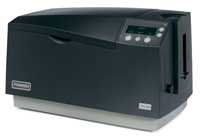
Needt technical assistance with your Fargo DTC550 printer? Many of the resources you need, such as current drivers and firmware, are easily found on the Fargo technical resources site.
The following items are currently available for download:
Printer Drivers:
- DTC550 Driver Windows2000/XP/2003
Printer Firmware:
- Fargo DTC550 firmware
User Guides
Diagnostic Tools:
- Workbench – This is a utility that provides security, diagnostic and firmware upgrades. With this download is the ability to develop password controlled access to your computer, locate sample Fargo cards, and obtain printer and ribbon information.
Visit the Fargo technical support page to locate the items needed.
For information about the Fargo DTC550 or other Fargo printers, contact us for a free consultation at 888-485-4696.
Hi Yves – usually a head-lift error combined with the ribbon jammed/broken errors indicate that the head-lift o-ring has broken (small rubber o-ring connecting the lift-motor to the head). That’s not unusual for a printer that old, as those rubber o-rings do get brittle and crack with age. (Fargo placed it on their “end-of-life” list March 31, 2011, and “end-of-service” December 15, 2014.) Assuming the error is this, and only this, we MAY be able to repair it, as we stock-piled some parts prior to Fargo stopping their manufacturing of them. You can certainly contact us at: +1 704.535.5200, or via email at safecard@safecardid.com for further info.
Beyond this, the recommended replacement model would be the Fargo DTC4500e, available in single- or dual-side versions, and with/without a card laminating module. We have those available new and, as of this writing, we also a limited number of refurbished single-side units in the outlet section of our on-line store.
I got a DTC550 printer keep displaying the following errors;
Lift Head Error
Ribbon Error
Ribbon Jam/Broken Error
The ribbon is not broken and the take up spool does not move to setup the ribbon.
Hi Andrew,
Most people use the work bench to print sample cards or use it to help with printer problems.
Use your ID card printing software to evaluate and print cards. If there is an issue with the printer, go to the print driver and print a test card. If the card prints ok, there is no need to use the Fargo workbench.
I am using fargo dtc550, but the problem is I dont know how to use the fargo workbench properly. please guys can you help me. thanks.
The best thing to do is to contact your local supplier’s technical department. They will have access to information about the specific printer purchased and the system components that you are trying to install. They should be able to troubleshoot your issues based upon your description of the problem and the products currently being installed.
Our technical department provides this service for all printer systems sold by our company. They also assist in the rare case where Fargo must be involved due to the receipt of a defective printer that needs to be exchanged.
I just got a DTC550 from a local supplier and try to install it for our client but the printer keep displaying the following errors;
Lift Head Error
Ribbon Error
Ribbon Jam/Broken Error